Native Kartra integrations
The connections live under Settings, then Integrations. A green status bubble means the connection is working. A red or yellow bubble means the connection needs attention. You need an active account with the other service, and some of them ask for an API key. Kartra published the introductory integrations guide on 21 July 2026, and the integrations collection holds 25 setup articles.
The native groups on that page:
- Payments: Authorize.net, Braintree, PayPal, Square and Stripe.
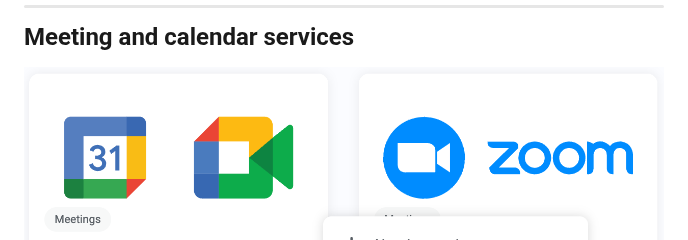
- Meetings: Google Calendar with Google Meet, and Zoom.
- Email delivery: Elastic Email, Mailgun, Postmark and SendGrid. KartraMail can send with none of those connected.
- SMS: Plivo, Twilio and Vonage.
- Memberships: aMember, Digital Access Pass, Kajabi, OptimizePress, s2Member and WishList Member. Kartra's own memberships run without any of these.
- WebinarJam and EverWebinar are covered in a separate guide. Zapier is on the same screen, and Kartra has to approve it first.
Kartra ActiveCampaign integration
ActiveCampaign is missing from those 25 articles. On the homepage, Kartra names it beside ConvertKit as an email tool the bundle is meant to replace. Contacts, tags and automations stay in whichever product holds them.
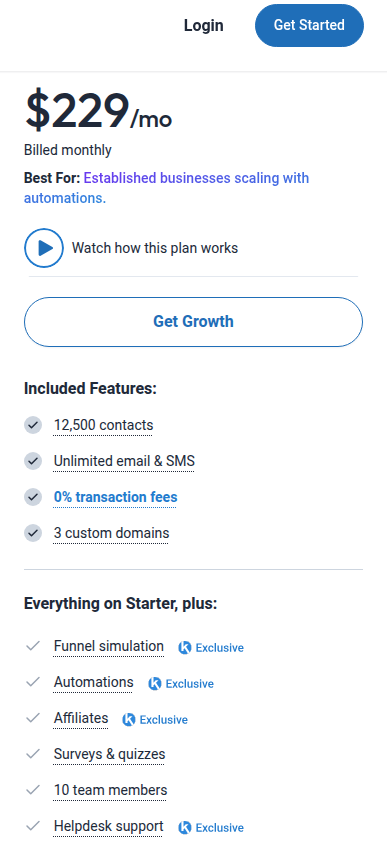
Zapier is how a lead gets in from another app. The Zapier guide says API access comes with Growth, Professional and Enterprise. On the pricing page, the Growth card lists automations, affiliates and the helpdesk. It omits the API from that card. From the integrations screen, add Zapier and fill in a short questionnaire. Kartra says approval usually takes one to two business days. If Zapier is missing from the provider list, a request is probably already waiting, and the tile shows the status.
In Zapier, connect Kartra with the inbound API key and the API password from the API page. A step that tags or edits a lead only works when that person is already stored. For someone new, the first Zapier step has to be Create New Lead. The guide never names ActiveCampaign as a built-in partner, so you choose it as the other app in the Zap.
Kartra treats a lead that arrives this way as covered by GDPR until they submit a form, survey, calendar, webinar registration or checkout hosted in Kartra. Email stays disabled until that form is submitted, including for a United States address. Kartra marks the location as unknown, which keeps the GDPR rules in force.
There is a second path for developers. Under Integrations, My API, Outbound API, you paste one or more URLs and choose the events. Kartra sends a raw JSON body when an event fires. It can fire when a lead is tagged, submits a form, buys, joins a list, books a calendar slot or visits a page. You write the script that reads it. The guide does not list ActiveCampaign as a destination.
Kartra Zoom integration
Zoom is one of the native integrations. It creates the Zoom meeting for a calendar appointment. From the integrations screen, choose Zoom and approve the connection on Zoom's site. The Zoom guide says every permission on that screen is required. One Zoom login can link to only one Kartra login. To move it, delete the old tile first.
After the connection is saved, you can set Zoom as the meeting room on a calendar. The booking confirmation can include the room link with the field calendar_meeting_room and the password with calendar_meeting_room_password. Reminder emails can use the same two fields. The editor's test-send button fills those fields with the word TEST. Book a real slot on the live calendar page to see the actual link.
Deleting the Zoom tile also deletes the Zoom meetings Kartra created for those appointments. If a live confirmation arrives with an empty link, the confirmation-email guide says to remove the connection, connect it again, and reset the meeting room under Sync on every calendar that used it.
A paid-traffic stack beside this bundle
ElasticFunnels is a funnel platform for teams that run paid traffic. It builds the pages, runs same-URL split tests, hosts the checkout, and keeps a click, an order, a rebill and a refund on one record. Buyers comparing it with Kartra are choosing between that paid-traffic stack and a coaching platform that already includes email and memberships. It has been around since 2023, so it is newer than Kartra, and independent write-ups are still scarce. That is the usual position until more detailed independent reviews exist. Until you run real volume through it, you are largely taking the vendor's word for how it behaves.
Kartra support
The contact article, from the same July update, puts help inside the product. After login, the Help icon is a chat bubble at the bottom right. KAI, the assistant, is available at any hour. A person joins only if you ask that chat to transfer you. The thread stays available if you leave the window. The article describes the chat. It does not list a phone number or hours for the human agents.
If you have forgotten your password, reset it on the login page. If you still cannot get in, the blue button at the bottom right of that screen reaches the same desk. Someone who has not signed up yet is sent to the plans page to chat with an account representative.
Two other articles name support@kartra.com. A blocked IP goes there with the login email, the last actions in the product, the error screenshot, a speed test and the blocked address. A security-question reset has to come from the login email, with the subject line Reset my security question. A message from any other address is not processed.
That desk is separate from the helpdesk you run for your own buyers. The helpdesk for your customers is included with Growth. Live chat on that helpdesk is included with Professional. Those lines deliver into your own inbox.
Long-time customers on Trustpilot describe human replies as much slower than the always-on assistant. An April 2025 review says live chat can leave you waiting for days without ever being activated. A January 2025 review cites limited hours, midnight to 4am and noon to 4pm PST, and ticket replies that take at least a day. A Capterra comparison still carries the line "Really bad support and buggy software."
See Kartra pricing for which plan includes the API.